🖥️ Operating System Fundamentals & Architecture
The Operating System (OS) is the master software conductor of your computer. It connects you to the hardware, runs your apps, manages memory, keeps files organized, and prevents programs from crashing into each other.
1. The Big Picture: What Does an Operating System Do?
- • Kitchen Counter (RAM): Fast, open table space holding the active ingredients you are cooking right now.
- • Storage Cupboard (SSD / Hard Drive): Huge pantry holding all raw food boxes (programs and files) for later.
- • The Chef (CPU): The super-fast worker chopping, mixing, and executing instructions (+, -, math).
- • The Manager (The OS): Decides which order gets cooked next, prevents kitchen fires, and makes sure no customer waits too long!
- • Road Intersections (System Bus): Shared highways where data travels between chips.
- • Vehicles (Running Apps): Hundreds of apps trying to move through memory at the same time.
- • Traffic Officer (The OS): Changes traffic lights, prevents traffic jams (deadlocks), and lets emergency ambulances (urgent hardware tasks) pass first!
1. Make it Easy (Convenience): Make complicated silicon chips and wires simple and comfortable for humans to use.
2. Make it Fast (Efficiency): Keep the CPU and RAM working at maximum speed without wasting power or sitting idle.
2. The 4 Layers of a Computer System
Think of a computer as a 4-floor building. Everyday apps live on top, while physical chips sit in the basement. Apps cannot touch raw hardware directly; they must ask the Kernel nicely through safe requests (called System Calls).

Everyday software like Chrome, VS Code, Spotify, and Games that run in a safe zone so they cannot crash your PC.
The screen buttons, mouse menus (⊞ Windows GUI), or black command prompt window (CMD) where you give instructions.
The permanent heart of the OS living in RAM. It controls the CPU schedule, memory allocation, and disk storage.
The physical parts you can touch: Multi-core CPU chip, DDR5 RAM sticks, fast NVMe SSD, and network cards.
3. The 5 Life Stages of an App (Process Lifecycle)
A **Process** is simply a program that is currently running. When you launch an app, the OS moves it through 5 simple life stages so you can run many apps smoothly at once:
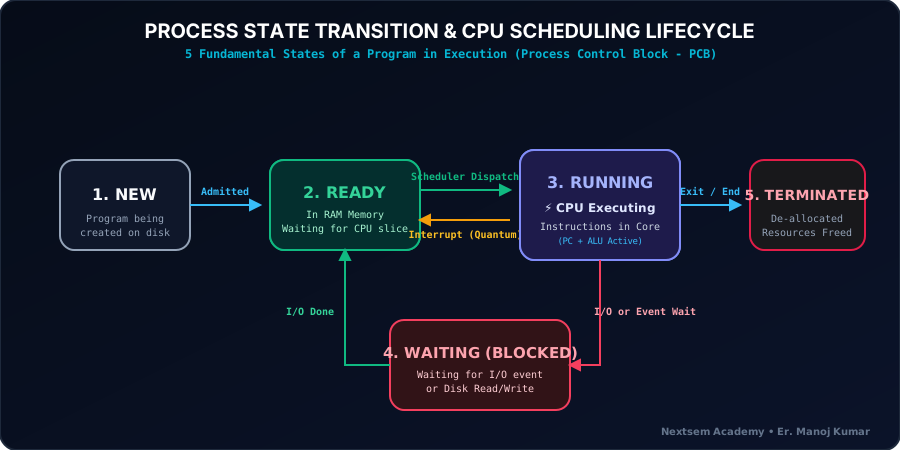
You double-clicked an app icon. The computer is loading its code from the SSD.
Loaded into RAM, waiting in line for its turn on the fast CPU.
The CPU chip is actively working on the app's instructions right now.
App paused while waiting for you to type on keyboard or save a file.
You closed the app. The OS frees up its RAM so other apps can use it.
A Process has its own memory house; Threads are helper workers sharing the same house!
4. Practice Lab: 🪟 Windows 11 Diagnostics Terminal
Click on any command tab below to see how real Windows administrators inspect the OS version, manage running memory, and check hard drive health:
OS Name:                   Microsoft Windows 11 Pro
OS Version:                10.0.26100 N/A Build 26100
System Type:               x64-based PC
5. How Operating Systems Evolved Over Time
| Era / Year | Stage Name | What Was New & Great | The Big Problem |
|---|---|---|---|
| 1940s - 1950s | Serial Processing | Plugboard wire switches and punched paper cards | Only 1 user at a time; CPU sat doing nothing most of the day |
| 1956 (IBM / GM) | Simple Batch Systems | Grouped jobs together; a Monitor program ran cards one after another | CPU still had to wait for slow card readers and magnetic tape |
| 1964 (IBM OS/360) | Multiprogramming | Held multiple jobs in RAM; when one paused for printer, CPU switched to another | Users could not type or interact with their program in real time |
| 1969 - 1973 (UNIX) | Time-Sharing & C Language | Gave each user split-second turns on keyboard terminals; created the C language | Huge success! Enabled multi-user systems and internet servers |
| 1981 - 1995 (PC Era) | PC-DOS & ⊞ Windows GUI | Brought mouse clicks, colorful windows, and personal computers to homes & desks | Made computing easy for everyone in the world to use |
| Modern (2020s) | 🪟 Windows 11, Linux, Cloud | 64-bit multi-core speed, strong security, and cloud apps running everywhere | Super fast, runs millions of tasks at the speed of light |
6. Quick Knowledge Check Quiz
1What is the main brain/core of the Operating System that stays inside RAM from the moment the PC turns on?
2How does the computer let you listen to music, download files, and type in Word all at the exact same time?
3What happens to a program when it is waiting for you to type a key on the keyboard?
4What is the key difference between a Process and a Thread?